You are already making the drive. Offering a ride on ShareSpace Carpool is a way to let people heading the same direction share the cost of it. This guide walks through what a driver does in the app, from entering your route to the moment a rider gets in, and keeps to what the app actually does today.

Before you publish: what you will need
Have these ready so publishing takes a minute or two:
- Your pickup point and drop-off point.
- Your departure time.
- The vehicle you will be driving.
- The number of seats you are willing to offer.
Think about the seat count before you start. It affects the price limit, which we cover below, and it is a promise to riders that those seats will be available.
Step 1: Add your route
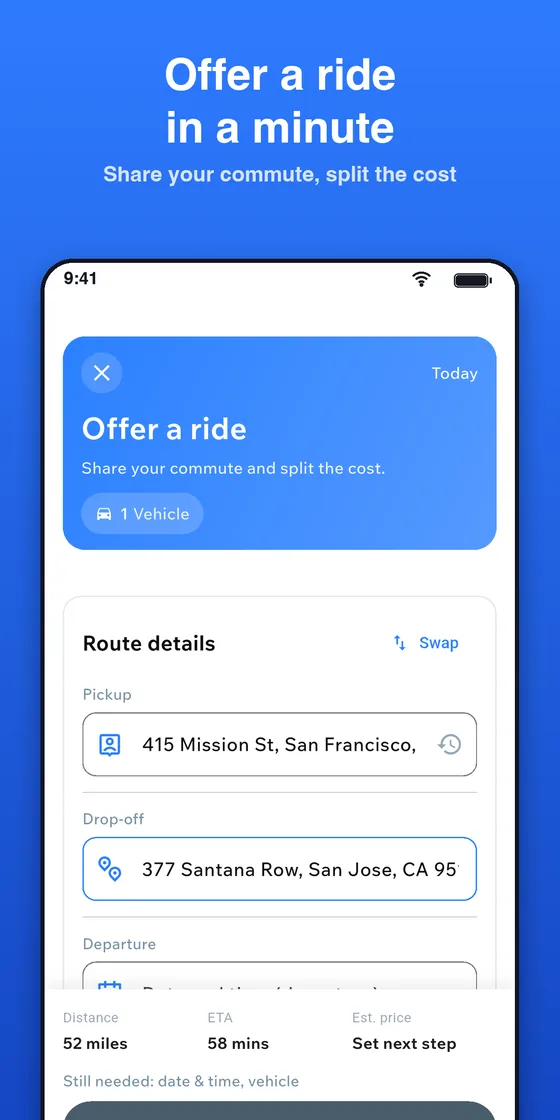
On Home, tap Offer a ride and enter your pickup, drop-off, departure time and vehicle. The app then lets you pick the route that fits you. If you normally take a particular road, choose the route that matches it, because riders open the ride to see the route before they book and will plan their pickup around it.
Step 2: Add stopovers if they make sense
Stopovers are optional. They are places along the way where you can pick up riders. Adding them can make your ride useful to more people, because a rider only needs a match for their own stretch, not for your whole trip. Riders can book just that stretch and pay only for it.
Keep stopovers realistic. Add a place only if you are comfortable stopping there at that point in the trip, since you will be keeping a schedule and other riders may already be in the car.
Step 3: Choose seats and set the price per seat
Choose how many seats you offer. Then set your price per seat. The price you can ask depends on the distance and the number of seats, and it is capped to the shared cost of the trip. You do not have to work out the limit yourself, because the app shows it while you set the price.
The idea behind the limit is simple: the cap is based on the IRS standard mileage rate times the trip distance, divided by the seats offered. That keeps a ride about sharing the expense of a trip, not making a profit. Two practical points follow from it:
- You can charge less than the limit, but not more.
- Offering more seats lowers the per-seat limit, which can make your ride cheaper for each rider.
For a fuller explanation, read carpool cost sharing explained.
Step 4: Review and publish
The app shows a summary of your ride. Check the route, the time, the seats and the price, then tap Publish Ride. Riders can now find and book it. If you drive the same route every day, you can instead set up a daily ride from Home by tapping I'm driving under "Same commute every day?" and the app publishes your rides for you each day. Our auto-publish guide explains how that works. Riley, the in-app assistant, can also help you publish rides, and you confirm before anything is published.
After publishing: chat, bookings and the ride start code
Once riders book, you can chat with them in the app and manage bookings in one place. Use chat to settle the exact meeting spot and any small changes. Riders do not need to share a phone number to talk to you, and you do not need to share yours.
The ride start code is part of every trip. Riders are encouraged to ask for it at pickup, because it confirms they are in the right car. Be ready to share it when a rider asks. After the trip, riders can rate the ride, so a punctual start and a friendly, predictable drive tend to show up in your rating.
What to expect on payment
The driver receives the full ride price in their wallet, with no deduction from your share. Riders pay the ride price plus a service fee and any tax on top, so the fee does not come out of what you receive for the seat. Riders may pay by wallet, card, Apple Pay or Google Pay, or hand you cash. If a rider pays you in cash, only the service fee is paid in the app. For rider-side detail, see how to pay for a carpool ride.
Remember that the price is a contribution toward a drive you were making anyway. Questions about how insurance or taxes apply to your situation should go to your insurer or a tax professional.
Frequently asked questions
Can I charge whatever I want per seat?
No. The price per seat is capped to the shared cost of the trip, and the app shows the limit while you set your price. You can choose a lower price.
Do I have to share my phone number with riders?
No. You can coordinate with riders through in-app chat.
Can I offer my regular commute without publishing it each day?
Yes. Set up a daily ride from Home using I'm driving, enter your route and the time you travel, and your rides are published for you each day. You can edit or stop it from your profile.
Offer your first ride
Publishing a ride takes only a few minutes, and an empty seat on a trip you were already taking is a good place to start. Download ShareSpace Carpool, add your route and see who is heading your way. If you want to know how much your own trip costs first, try our commute cost worksheet.
Ready to carpool?
Download ShareSpace Carpool, free on iPhone and Android.