
The first carpool is the hardest. After that, the effort is mostly repetition: searching, booking or publishing the same trip again and again. A routine removes that work. If you travel the same way at the same time most days, you can set the commute up once and let the app handle the repeats. This guide shows how, and how to keep the routine steady when real life gets in the way.

Why a routine beats one-off rides
A regular carpool is easier to trust. Riders know when the car will arrive, and drivers know who is likely to be waiting. Both sides can plan their mornings around a predictable pattern. Repetition also saves time, because you are not re-entering the same pickup, drop-off and time each day.
It is also where small, steady savings tend to come from. A single shared ride may not change much, but a routine repeated across a week can add up. How much depends on your distance and seats, so treat any number as an estimate. Our post on weekly commute planning with carpools looks at the planning side in more detail.
The Same commute every day feature
ShareSpace Carpool has a section on Home called Same commute every day? It is designed for people who make the same trip on a regular basis. You choose one of two options:
- I'm driving. Enter your route and the time you travel. Your rides are published for you every day, so riders can find and book them.
- I need rides. Enter your route and the time you travel. You are matched to rides every day.
You can edit or stop a daily ride at any time from your profile, so you are not locked in. That flexibility matters, because few commutes stay identical forever.
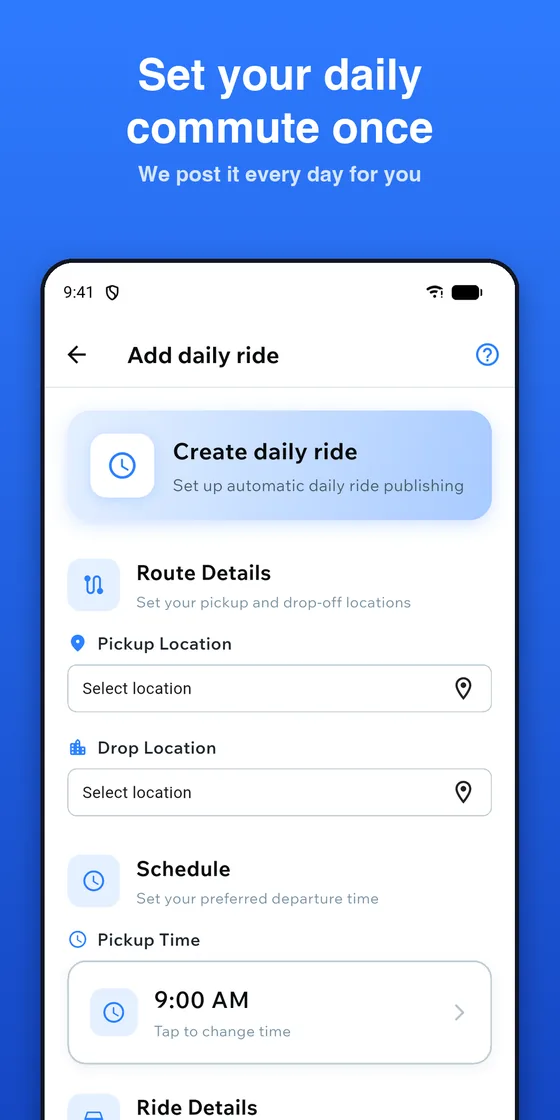
Setting it up as a driver
If you drive the same route most days, the daily option saves the most effort. Follow these steps:
- Open Home and find Same commute every day?
- Tap I'm driving.
- Enter your route and the time you travel.
- Confirm the details.
After that, your rides are published every day without you retyping them. The price per seat is set by the driver and capped to the shared cost of the trip, and the app shows the limit. For a closer look at how automatic publishing works, read our auto-publish feature guide. Riley, the in-app assistant, can also help drivers publish regular commutes, and you confirm before anything is published.
Setting it up as a rider
Riders have two routes to the same result. On Home, tap I need rides under Same commute every day?, then enter your route and the time you travel. Or, if a search turns up nothing, use Repeat daily as rider from the options shown when you cannot find a match. Either way, you are matched to rides every day, which saves you from searching each morning.
You can still compare what is offered. Each ride shows the departure time, price per seat, how far you walk to pickup and the driver, and you see the total before you confirm. Before you ride, check the driver's rating and verified badge, and ask for the ride start code at pickup.
Tips for a stable routine
A routine only works if people can rely on it. These habits help:
- Pick a realistic time. Choose a departure time you can hit on a normal day, not on a perfect day.
- Keep the pickup spot simple. A fixed, easy-to-find place avoids confusion.
- Agree on the basics. How long to wait, what to do if someone is late, and how to cancel politely.
- Use chat early. In-app chat lets you confirm the plan without sharing your phone number.
- Review now and then. If your hours change, update the routine instead of letting it drift.
For the social side, see carpool etiquette dos and don'ts.
When plans change
Even a solid routine meets exceptions: a day off, a doctor's appointment, a late meeting or a holiday week. Planning for these makes the routine stronger, not weaker.
- Edit or stop the daily ride. From your profile you can change or pause a daily ride when your schedule changes for a while.
- Tell your partner quickly. Use in-app chat as soon as you know. Early notice is the kindest thing you can do.
- Cancel before the ride. If you cancel a paid booking before the ride starts, everything you paid returns to your wallet.
- Have a backup. Keep an alternative in mind, such as transit or a different ride, for the odd day your carpool is not available.
Frequently asked questions
Do I have to commit to every day of the week?
The feature is built around a commute you make regularly, and you can edit or stop a daily ride at any time from your profile. If your schedule only matches on some days, you can also search and book individual rides as needed.
What happens if no ride matches my daily request?
Riders are matched to rides every day, so a match depends on drivers offering a similar route and time. It can take a little time for matches to appear, so a slightly wider time window and word of mouth among coworkers and neighbors may help.
Can I still use the app for one-off trips?
Yes. A daily routine does not replace the regular search. You can still search, offer a ride or ask Riley on any day, and you confirm before anything is booked or published.
Set it once and ride
A repeating routine turns carpooling from a daily decision into a habit. Open ShareSpace Carpool, free on iPhone and Android, find Same commute every day? on Home, and set up your route and time. Then adjust only when your plans change.
Ready to carpool?
Download ShareSpace Carpool, free on iPhone and Android.